
ClearPath AI · For land-clearing operators
Acreage alone won’t tell you what to bid. Your crew costs, production time, access, vegetation and job scope all matter. ClearPath helps land-clearing and forestry-mulching owners think through the price—and the marketing, sales and operations decisions that come next.
Built for the work you actually do
ClearPath is focused on land clearing and forestry mulching—not generic business advice. Give it your situation and ask about the parts of running an operation that are hard to settle from the cab of a machine.
Talk through the scope, your costs, and what you need to consider before sending a bid.
Work through a stalled quote, a lead conversation, or the next question to ask a customer.
Pressure-test decisions about equipment, hiring, capacity, and where to focus next.
The pricing question
There isn’t one honest price per acre for every parcel. Clearing light brush on level ground is a different job from tackling dense growth on a slope with limited access. A useful bid starts with what the work will cost your operation and how long the job is likely to take.
Use this as a practical checklist before you send a quote—not as a universal rate or an automatic estimate.
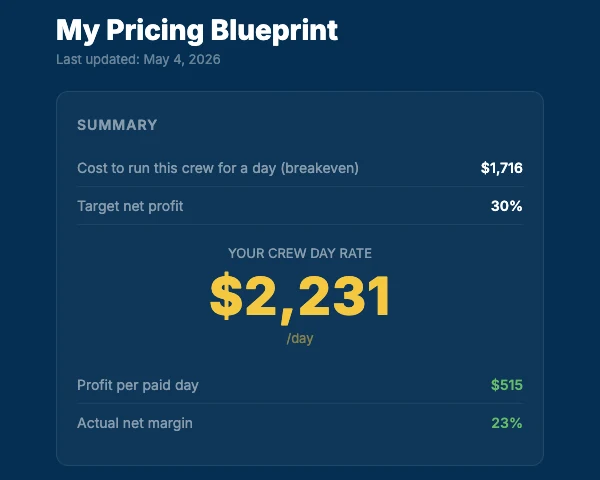
Account for labor, owner pay, equipment payments, fuel, wear and maintenance, insurance, and overhead. If you don’t know what a working day costs, an attractive bid can still lose money.
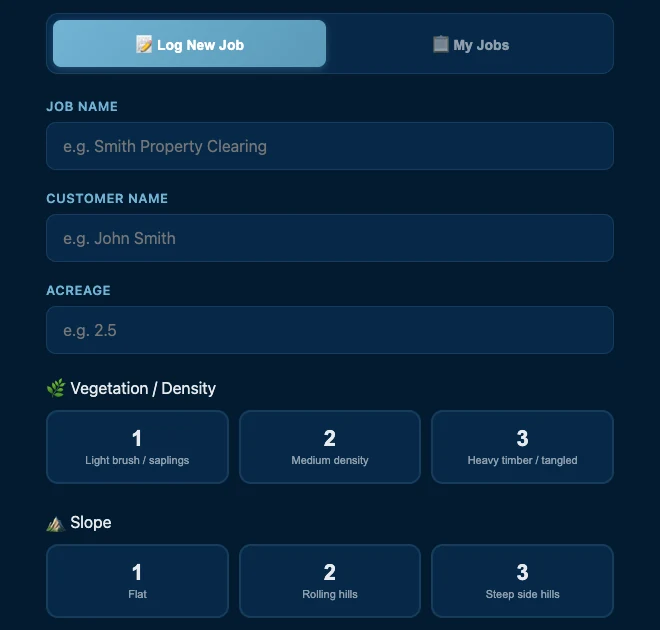
Note acreage, vegetation density, terrain, access width, obstacles, material handling, and the finish the customer expects. These conditions change the time and equipment needed; acres by themselves do not describe the job.
Use your own past jobs where possible. Allow for setup, travel or mobilization, difficult sections, and work that isn’t obvious from a satellite image. If the scope is uncertain, state what you’re assuming.
Work from your expected working time and job-specific costs, then include the margin your business needs. Put the included work, exclusions, access assumptions, and any separately priced items in writing so the customer understands the number.
After the work, compare estimated days with actual time and costs. Record the ground conditions that changed production. Those notes make the next bid more informed than the last one.
See the product
ClearPath’s Pricing Blueprint is designed to connect crew costs to a day-rate discussion. Bring your numbers and the job conditions, then use the advice to check whether the bid makes sense for your operation.
It won’t inspect a property for you or promise a profitable price. You remain responsible for the site visit, scope, quote, and final decision.
Learn from completed work
What looked simple at the quote stage may have taken longer because of dense material, slope, or a difficult entrance. ClearPath Pro’s production tracking lets you log completed work and compare the conditions you planned for with what happened in the field.
Over time, your own records can give you a more useful starting point for the next similar job. This depends on the data you enter; ClearPath does not automatically know what happened on your jobsite.
How to use it
The more relevant context you provide, the more useful the conversation can be. You don’t need a polished business plan to ask a question.
ClearPath is advice, not a crew or an agency service. It doesn’t run your ads, send your quotes, or make the final decision for you. RISE’s hands-on marketing services remain separate.
The rest of the business
Pricing is the question that starts the conversation. ClearPath also helps you think through the work around the bid—without pretending software can replace your team.
Ask what message to test, how to describe your services, or how to approach an ad or video script. Bring the campaign results you want it to consider; ClearPath does not run your ads for you.
Work through the first call, a site visit, a proposal, or the follow-up when a quote goes quiet. Use its suggestions to sharpen your own conversation with the customer.
Talk through production, scheduling, crew capacity, equipment decisions, and what a completed job taught you. Your real costs and field notes matter more than a generic benchmark.
ClearPath Pro · Business memory
Pro’s business memory can hold the information you choose to enter about your machines, markets, typical pricing and goals. As you update that profile and log production, ClearPath can use the saved context in later guidance. That is what “learning as it goes” means here: the advice gets grounded in the business information you provide. Keep the profile and job records current so later questions have the right context.
Start with what you know, correct what changes, and check every recommendation against the job in front of you. The official Pro overview explains the current memory and tracking features.
Questions operators ask
It can help you think through a bid using the job details and costs you provide. No tool can verify a property from a prompt alone. Walk the site, define the scope and assumptions, and make the final pricing decision yourself.
Know your crew day cost and the likely production time. Include labor, equipment, fuel, wear, overhead, and the job-specific work you will actually perform. A calculator is only as useful as the numbers and scope you put into it.
ClearPath Pro offers business memory and production tracking. You provide and update the details it uses, including your machines, markets, pricing and goals. Keep your saved details and job records current; an answer can only reflect the context ClearPath has.
No. ClearPath is an advisor for your decisions. RISE’s hands-on marketing services are separate. ClearPath does not publish ads, follow up with customers, or run your operation for you.
ClearPath AI
See how ClearPath works and choose the plan that fits your operation on the official ClearPath site.